Hallart: A Brushed Typeface for Web Design
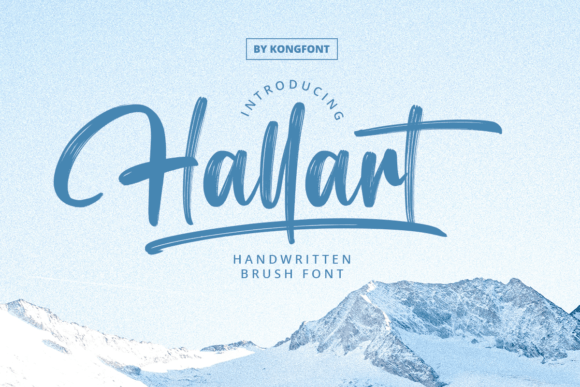
As a web designer, I’m always on the lookout for fonts that bring both personality and clarity to a site. Hallart Brush Font caught my eye during a recent project where I was designing a hero section for a boutique online store. The soft, brush-like strokes of Hallart added a warm, handmade feel that perfectly matched the brand’s aesthetic.
Visual Personality and Digital Appeal
Hallart has a distinct visual character—its letterforms are fluid, with subtle swashes and a handcrafted energy that feels both modern and timeless. It’s not just a font; it’s a design element that can elevate a website’s tone. Whether used in headers, buttons, or call-to-action elements, Hallart brings a sense of creativity and approachability.
The font works best when used as a display typeface rather than for body text. Its decorative nature makes it ideal for headlines, logos, and short phrases where it can shine without overwhelming the reader. On a landing page, for instance, Hallart can be paired with a clean sans serif to create a balanced visual hierarchy.
Web Layout Performance
I tested Hallart across multiple screen sizes and found it performed well on desktops and mobile devices. The font scales nicely, maintaining its legibility even at smaller sizes. However, I noticed that on very small screens or when used in tight spaces, some of the finer details could get lost. This is something to keep in mind when using it for navigation menus or form labels.
When placed over image banners or dark backgrounds, Hallart stands out beautifully. Its contrast with solid colors adds depth and visual interest. But I recommend avoiding it for long paragraphs or dense blocks of text. For those, a simpler font like a sans serif would be more practical.
Use Cases in Web Design
Hallart is perfect for creative portfolio sites, coaching websites, and product landing pages where a personal touch matters. I used it for a course sales page header, and it gave the design a friendly, inviting vibe. It also worked well for a blog graphic, where it served as a decorative accent without distracting from the content.
For an online store, I paired Hallart with a minimalist sans serif for product titles and descriptions. The combination created a clean, professional look while still allowing the font to make an impact where it mattered most. It’s especially effective in hero sections, where it can draw attention and set the tone for the entire site.
On a digital brand kit, Hallart helped define the identity of a new startup. It was used in social media graphics, email templates, and promotional banners, creating a cohesive and memorable visual language. The font’s versatility made it easy to integrate into different design assets without compromising the overall style.
Font Pairing and Accessibility
When working with Hallart, I found that pairing it with a simple, readable font enhances its effectiveness. A clean sans serif like Montserrat or Lato works well for body copy, while a serif font like Playfair Display can add a more editorial feel. These pairings help maintain readability while letting Hallart take center stage where it’s needed most.
Accessibility is another consideration. Hallart may not be the best choice for users who rely on screen readers or for interfaces that require high contrast. In such cases, a more traditional font would be preferable. But for most design projects, especially those focused on branding and aesthetics, Hallart is a strong option.
Practical Considerations for Web Use
Before implementing Hallart on a live site, I always check for webfont availability and file formats. It’s important to ensure that the font loads quickly and doesn’t slow down the user experience. I also verify that it includes all necessary weights and alternates, which can be useful for customizing the look of a design.
For commercial use, I recommend checking the licensing terms to make sure the font can be used across different platforms and projects. Many fonts have restrictions on how they can be applied, so it’s worth reviewing these details carefully before finalizing a design.
Overall, Hallart is a valuable addition to any web designer’s toolkit. Its soft, brush-like style adds a human touch to digital projects, making it ideal for brands that want to stand out while maintaining a professional appearance.